Category: Apple
Apple. The coolest company in the world.
Once-proud HP reduced to shamelessly peddling Apple MacBook knockoffs
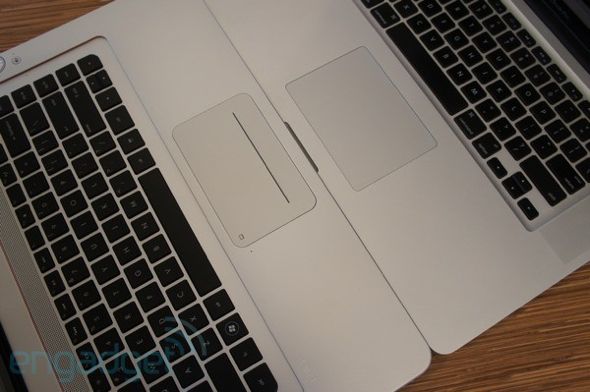
Once-proud HP reduced to shamelessly peddling Apple MacBook knockoffs – MacDailyNews – Welcome Home: ““It’s painfully obvious where HP drew its inspiration for its newest Envy laptops,” Dana Wollman reports for Engadget. “It’s not because of any single design choice, like the aluminum unibody chassis, island-style keys, glowing logo or giant clickpad; it’s all of the above!” Wollman reports. “HP’s latest 15-incher is the most flagrant Mac imitation we’ve seen in some time, and the resemblance is close enough that you could, at first glance, mistake the interior for an MBP. “
Wollman reports, “Of course, HP threw in some flourishes that keep it from being a total facsimile: the lid and underside are black, not silver, the keyboard area has a thin red ring around it and there are Beats-branded volume controls on the laptop’s right side.””
GarageBand Mac gets updated to pull in iPad projects | 9 to 5 Mac GarageBand Mac gets updated to pull in iPad projects | Apple Intelligence
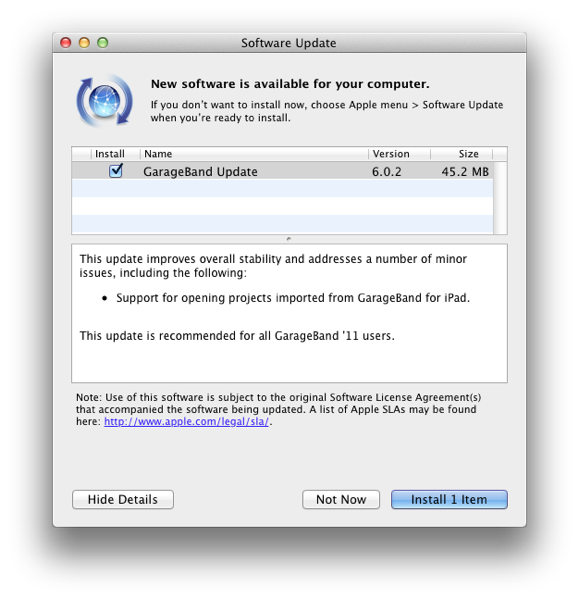
GarageBand Mac gets updated to pull in iPad projects | 9 to 5 Mac GarageBand Mac gets updated to pull in iPad projects | Apple Intelligence: “The 47MB update is available now through Software Update or via Apple’s site as a standalone installer.”
Apple Help Library
What I think Obama is meeting with Jobs, Schmidt, and Zuckerberg about – The Oatmeal

What I think Obama is meeting with Jobs, Schmidt, and Zuckerberg about – The Oatmeal: “What I think Obama is meeting with Jobs, Schmidt, and Zuckerberg about “
iClarified – Mac OS X – How to Green Screen Using iMovie ’09
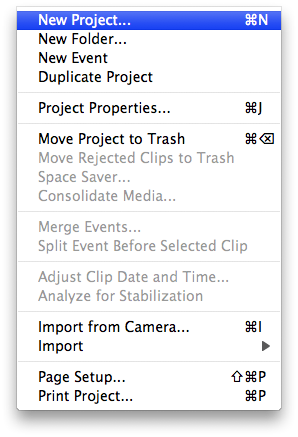
iClarified – Mac OS X – How to Green Screen Using iMovie ’09: “This entry needs translation. To help us and submit a translation please click here
These are instructions on how to use the iMovie ’09 green screen feature to change the background of your video clip.
Step One For this tutorial you will need two video clips; one that has been recorded with a green screen background and one that is the background you would like to change to.
Launch iMovie ’09 by clicking its icon in the dock or in the Applications folder. “
Incredible “Psychedelic” Steve Jobs Portrait | Cult of Mac
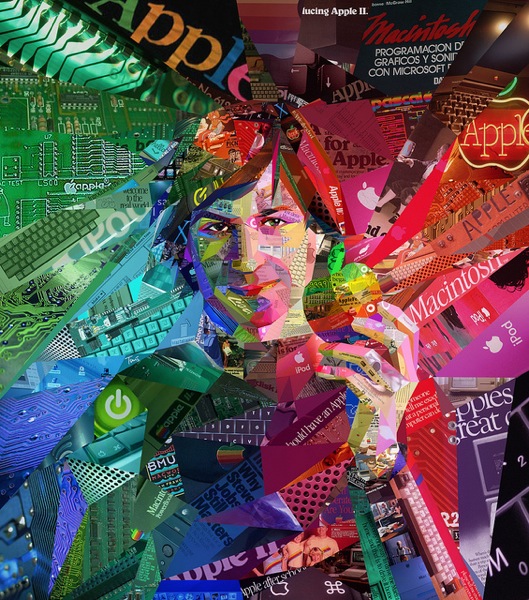
Incredible “Psychedelic” Steve Jobs Portrait | Cult of Mac: “It took Athens, Greece-based artist Charis Tsevis about a week of 16-hour days to create this trippy mosaic portrait of Steve Jobs for Brazilian magazine ALFA.
Tsevis is an old hand at innovative Apple collages, whose work has appeared in Fortune and inspired a send-up of Microsoft CEO Steve Ballmer.
This one is something of a departure, taking us back to the colorful early days of Apple history. More on the inspiration behind it and close-ups after the jump.”
Where Does Apple Draw Its Design Inspiration? Meet Dieter Rams.
To Apple fanboys/girls Senior Vice President of Industrial Design, Jonathan Ive, is a god. But where does Jony draw his inspiration? Meet german industrial designer, Dieter Rams:
Dieter Rams: Less and More Interview from Gestalten on Vimeo.
MacDailyNews – Apple iPads takeover CNBC’s Fast Money set (with stills)
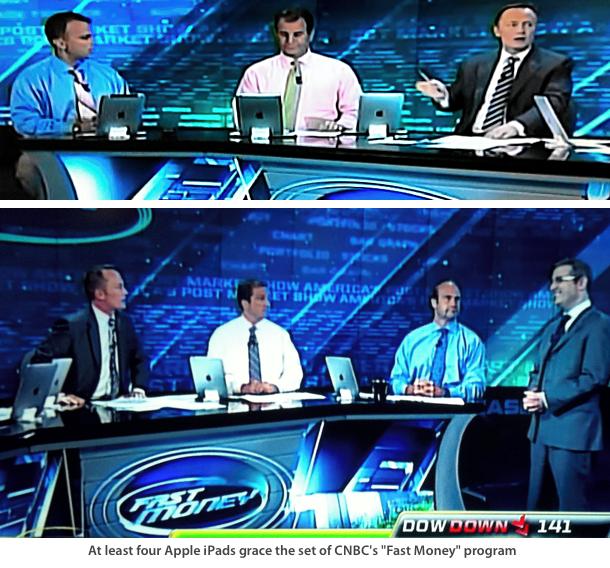
MacDailyNews – Apple iPads takeover CNBC’s Fast Money set (with stills): “MacDailyNews reader ‘Joe Architect’ alerted us to flip on CNBC a few minutes ago and we noticed right away that Apple’s iPads have taken over the set on CNBC’s ‘Fast Money’ set. They may have been there for some time, but we just noticed them today”
Brabus’s iBusiness is a Mercedes-Benz S600 tricked out Apple style

Brabus’s iBusiness is a Mercedes-Benz S600 tricked out Apple style: “We’ve seen the iPad implemented both at school and at work, but in your car? That’s the idea behind the iBusiness, a Mercedes-Benz S600 that’s been tricked out with Apple gear aplenty by Brabus. Get this — you can see the two iPads and keyboards in the back seats, but there’s also a Mac mini in the back and a 64gb iPod touch as well. The display above is a 15.2′ TFT display, and all of the gear connects to the Internet via a high speed 3G system. The iPads can also control the car’s multimedia system, navigation systems, and the built-in telephone system.”
Secretly Monitor Employees Using Their Macs | Tips and Tricks | Mac360

Secretly Monitor Employees Using Their Macs | Tips and Tricks | Mac360: “Andrew Grove, one of the founders of chip giant Intel, is credited with saying that ‘only the paranoid survive.’ Many in positions of authority believe it to be true.
If you have an office or school full or Macs, or just a family of Mac users, do you know what they’re doing on their Macs? Macs can be guarded with secret monitoring and recording apps that capture everything a user does on their Macs. Everything.”
Forgot Mac Password? How to Reset Your Mac Password (with or without CD) – OS X Daily
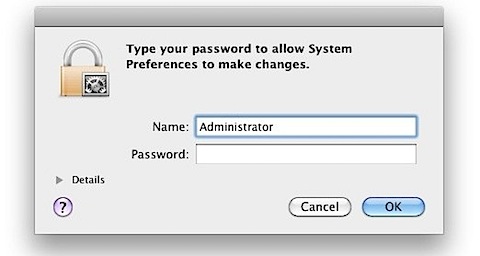
So you forgot your Mac password… uh oh. Don’t worry, it happens and you aren’t out of luck. You’ll need to reset the forgotten password and there’s several ways to do this, we’ll focus on the two best methods; one does not require a Mac OS X installer CD and is a great hack, and the other is much more simple if you happen to have a Mac OS X DVD laying around.
[From Forgot Mac Password? How to Reset Your Mac Password (with or without CD) – OS X Daily]
!!!

iPhone Explorer – A USB iPhone browser for Mac and PC
iPhone Explorer lets you use an iPhone, iPod Touch or iPad as if it were in disk mode or a flash drive. iPhone Explorer is an iPhone browser for Mac & PC that lets you browse the files and folders on your iPhone as if it were a normal USB flash drive or pen drive. You can use the easy drag-and-drop methods to add or remove files and folders from the iPhone. Compatible with all iPhones and iPod Touches including the new iPhone 4 and iOS 4 firmware.
[From iPhone Explorer – A USB iPhone browser for Mac and PC]
How to merge pdf files with preview in Leopard | Macintosh How To
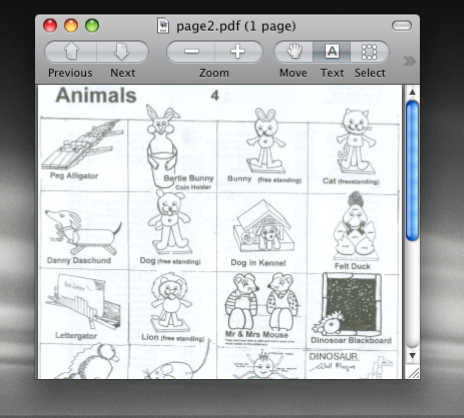
Leopard and Snow Leopard have the ability to edit pdf files, move pages around, and even merge two pdf documents together. It’s built right in. In OS X combining pdf documents is now easy and you don’t need a third party program to do it! Here is how to join two or more pdf files together into one.
[From How to merge pdf files with preview in Leopard | Macintosh How To]
MacRabbit – CSSEdit – Web 2.0 in Style
Style Sheets, easy and quick
Design beautiful, innovative and fast-loading web sites… with a beautiful, innovative and fast app. CSSEdit’s intuitive approach to style sheets and powerful previewing features will make you deliver awesome standards-based sites in no time!
Everyone is welcome: CSS newbies and power usersBecause of CSSEdit’s unique focus on style sheets, it offers a wide range of features for any level of expertise. Starting out? Selector Builder and advanced visual editors will gradually help you understand CSS instead of dumbing you down.
For anyone well-versed in CSS, the Live Preview and intelligent source environment are invaluable tools to get your website or application styled in a fraction of the time it took before. Add powerful X-Ray web page inspection, and you’ve got an unbeatable CSS debugging suite.
!!!

One iPhone, Two Different Numbers, Courtesy Of Toktumi’s Line2 App [Review] | Cult of Mac
MacDailyNews – Blodget: The odds are increasing that Microsoft’s business will just completely collapse
“Don’t mean to be alarmist, but the odds are increasing that Microsoft’s business will just completely collapse,” Henry Blodget writes for Business Insider. “The market still thinks Microsoft’s long-term prospects are pretty good, though. The stock is trading at a respectable 14X P/E. The company has cash flow gushing out of its ears. The consensus is that Microsoft will keep growing, just more slowly. But the odds are increasing that even this will prove to be wishful thinking.”
Pocket protector, meet your cousin: the iPad suit

Apple products often spawn ecosystems of product categories to facilitate their existence. The iPod and iPhone, for instance, gave birth to speaker docks, FM transmitters and protective cases. And now an ecosystem of products is materializing for the iPad: they include cases of all sorts, bean bag lap rests and, yes, clothes. Suits, to be specific.
Upscale Manhattan tailor Mohan’s Tailor Shop, which boasts a clientele including Barry Bonds, Walt Frazier and Gary Carter, recently unveiled a custom made suit with a jacket pocket to accommodate the iPad (as reported in the WSJ). The impetus for it was the result of several customer requests for the feature; since its unveiling, the tailor says it has received about “100 calls and scheduled several dozen appointments with customers over the next several weeks” for a fitting.
Mohan’s must be pulling off some magic of its own to fit Apple’s “magical” device in a jacket pocket. At 1.6 pounds, I’m guessing the iPad may pull one side of the jacket lower than the other, thus necessitating some kind of counterbalance.
Personally, I’d rather just use a bag.
At D, all hail the iPad | Beyond Binary – CNET News

RANCHO PALOS VERDES, Calif.–There is one clear star emerging at this year’s D: All Things Digital conference: Apple’s iPad.
In addition to all the stage time that the tablet got during Steve Jobs’ talk last night, it is also dominating the discussion with other presenters.
Dreamworks CEO Jeffrey Katzenberg sang Jobs praises for several minutes, before declaring: “His greatest accomplishment is going to be this tablet.”
“As Steve said last night, there is something indescribable about the connection,” Katzenberg said. “Our children are going to get educated on it. They are going to play on it. They are going to consume more media on that than any other (device).”
Katzenberg said he now only carries his BlackBerry and iPad and not a traditional laptop.
“The laptop is yesterday’s news,” he said.
Joe Wilcox: “The Windows Era Is Over” | Cult of Mac

The Windows era is over announces Joe Wilcox at Betanews. Is it?
He certainly makes a compelling argument. Like other tech behemoths before it, Microsoft’s products are simply being rendered irrelevant by new technologies, new ideas, and new products that have come out of the blue and swept them aside.
Largely thanks to Apple’s innovation and success in the consumer space, mobile computing is no longer a niche product. It’s mass market, and the iPad is going to spawn so many copycat products that the stores will be swimming with them. Apple showed the way, and everyone else in the tech business saw instantly that they should follow along, as fast as possible.
Or as Joe puts it: “A new era dawns.”
What’s more, Joe says Microsoft no longer has the loyalty of its partners. Intel sells chips to Apple now. HP has purchased Palm and is working furiously to make new tablet devices. It’s as if the industry has seen Microsoft’s future, and wants to distance itself from it, to break the connections.
So as Apple breezes past Microsoft in the market cap stakes, where next for Windows? Are the improvements made in Windows 7 enough to turn things around, and slow the momentum? Is Joe right to say the Windows era is over?
Apple Dethrones Microsoft As World’s Biggest Tech Company
WELL I GUESS THAT ANSWERS THAT!
SEATTLE — Apple has surpassed Microsoft as the largest technology company in the world by market capitalization.
Apple’s move comes as the company’s iPhone, and now its iPad tablet computer, have taken on more of the personal computing tasks once handled by computers running Microsoft’s Windows operating system and other programs.
Market cap is the dollar value of a company’s outstanding shares. On Wednesday, Apple Inc.’s shares slipped $1.11 to close at $244.11, making its market cap about $222 billion.
But Microsoft Corp.’s stock fell $1.06, or 4.1 percent, to close at $25.01, for market cap of about $219 billion.
The only U.S. business with a higher market value is Exxon Mobil Corp. The oil company’s market cap is about $279 billion, based on Wednesday’s closing price of $59.31.
(This version CORRECTS the spelling of Exxon Mobil)
[From Apple Dethrones Microsoft As World’s Biggest Tech Company]
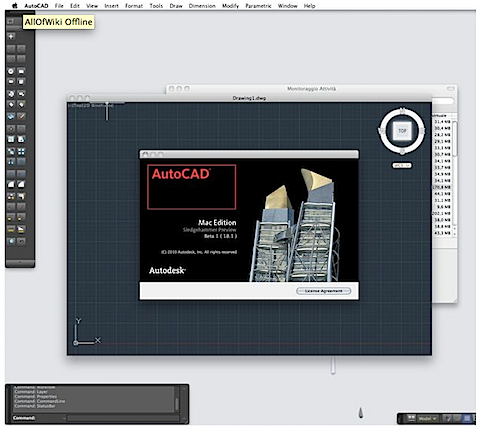
MacDailyNews – AutoCAD returns to Mac; first screenshots posted online (with image)
Cupidtino
Cupidtino is a beautiful new dating site created for fans of Apple products by fans of Apple products! Why? Diehard Mac & Apple fans often have a lot in common – personalities, creative professions, a similar sense of style and aesthetics, taste, and of course a love for technology. We believe these are enough reasons for two people to meet and fall in love, and so we created the first Mac-inspired dating site to help you find other Machearts around you.
Cupidtino will launch in June 2010 exclusively on Apple platforms – Safari, iPhone and iPad apps. It’s time to share the love.[From Cupidtino ]
50 Mac Essentials #4: Perian | Cult of Mac

Perian calls itself “the Swiss Army knife for QuickTime,” a description that’s pretty much spot-on.
Technically, Perian is a “QuickTime component” and it’s a preference pane rather than an application (which means that after installing, you’ll find it in System Preferences, not in your Applications folder).
But if the technical details leave you blurry-eyed, all you need to know what what Perian actually does. It gives QuickTime – the video player that comes built into your Mac – additional super powers, enabling it to play video files it would otherwise have refused to play.
That means you can watch AVI files from Windows-using friends. You can watch bits of video in dozens of formats (here’s a list) and it will all Just Work. Once you’ve got Perian installed, you won’t have to worry about it, nor will you be troubled by pesky conversions from one format to another just to view the latest hilarious lolcat.
Perian is free (so you don’t have to pay for it, though donations are welcome), and it’s open source (so you can take it to pieces to see how it works, if you wish), and it’s a really good idea to have it installed on your Mac. You’ll need 10.4.7 or higher.
(You’re reading the 4th post in our series, 50 Essential Mac Applications: a list of the great Mac apps we at the Cult value most. Read more.)
LogMeIn Ignition for the iPad – Apple Gazette
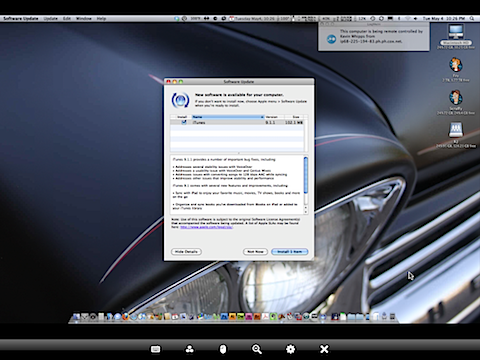
Back in December, I reviewed LogMeIn Ignition for the iPhone. For the uninitiated, LogMeIn is a service that allows you to sign onto your computer remotely to access the desktop. They had just released the Mac client, and the iPhone version was a great way to get to your files over a 3G connection. Ultimately, the only problem was the size. It’s a touch difficult navigating around on the tiny screen, but it’s better than nothing, right?
Well now they’ve released an iPad version of the app and here’s the good news: If you already have the iPhone version, just install the App onto your iPad via iTunes, and check for an update. That’s what I did, and 10 minutes later I was surfing my computer using the iPad.
The extended real estate of the iPad makes using your desktop remotely substantially easier than on the iPhone. Your finger becomes the mouse, with one tap becoming a left click, and all of the typical multi-touch features still working the same way. As is to be expected with a program like this, the connection isn’t as fast as it would be if you were in front of your computer. But it’s not like you’re going to hammer out a presentation on your desktop via your iPad. For me, I see this as being a great program for those “Oh Crap” moments when you’ve forgotten a file at home and need it immediately, or if you just want to show a buddy something you have at your other computer.
The iPad’s big screen makes programs like this shine. Yes, LogMeIn works on the iPhone, and it works pretty well. But adding those extra inches of room on the screen with the iPad makes it much, much better.
Flash SUX!!!!
Steve Jobs has posted a rare open letter on Apple’s website entitled “Thoughts on Flash.” Here it is verbatim:
Apple has a long relationship with Adobe. In fact, we met Adobe’s founders when they were in their proverbial garage. Apple was their first big customer, adopting their Postscript language for our new Laserwriter printer. Apple invested in Adobe and owned around 20% of the company for many years. The two companies worked closely together to pioneer desktop publishing and there were many good times. Since that golden era, the companies have grown apart. Apple went through its near death experience, and Adobe was drawn to the corporate market with their Acrobat products. Today the two companies still work together to serve their joint creative customers – Mac users buy around half of Adobe’s Creative Suite products – but beyond that there are few joint interests.
I wanted to jot down some of our thoughts on Adobe’s Flash products so that customers and critics may better understand why we do not allow Flash on iPhones, iPods and iPads. Adobe has characterized our decision as being primarily business driven – they say we want to protect our App Store – but in reality it is based on technology issues. Adobe claims that we are a closed system, and that Flash is open, but in fact the opposite is true. Let me explain.
First, there’s “Open”.
Adobe’s Flash products are 100% proprietary. They are only available from Adobe, and Adobe has sole authority as to their future enhancement, pricing, etc. While Adobe’s Flash products are widely available, this does not mean they are open, since they are controlled entirely by Adobe and available only from Adobe. By almost any definition, Flash is a closed system.
Apple has many proprietary products too. Though the operating system for the iPhone, iPod and iPad is proprietary, we strongly believe that all standards pertaining to the web should be open. Rather than use Flash, Apple has adopted HTML5, CSS and JavaScript – all open standards. Apple’s mobile devices all ship with high performance, low power implementations of these open standards. HTML5, the new web standard that has been adopted by Apple, Google and many others, lets web developers create advanced graphics, typography, animations and transitions without relying on third party browser plug-ins (like Flash). HTML5 is completely open and controlled by a standards committee, of which Apple is a member.
Apple even creates open standards for the web. For example, Apple began with a small open source project and created WebKit, a complete open-source HTML5 rendering engine that is the heart of the Safari web browser used in all our products. WebKit has been widely adopted. Google uses it for Android’s browser, Palm uses it, Nokia uses it, and RIM (Blackberry) has announced they will use it too. Almost every smartphone web browser other than Microsoft’s uses WebKit. By making its WebKit technology open, Apple has set the standard for mobile web browsers.
Second, there’s the “full web”.
Adobe has repeatedly said that Apple mobile devices cannot access “the full web” because 75% of video on the web is in Flash. What they don’t say is that almost all this video is also available in a more modern format, H.264, and viewable on iPhones, iPods and iPads. YouTube, with an estimated 40% of the web’s video, shines in an app bundled on all Apple mobile devices, with the iPad offering perhaps the best YouTube discovery and viewing experience ever. Add to this video from Vimeo, Netflix, Facebook, ABC, CBS, CNN, MSNBC, Fox News, ESPN, NPR, Time, The New York Times, The Wall Street Journal, Sports Illustrated, People, National Geographic, and many, many others. iPhone, iPod and iPad users aren’t missing much video.
Another Adobe claim is that Apple devices cannot play Flash games. This is true. Fortunately, there are over 50,000 games and entertainment titles on the App Store, and many of them are free. There are more games and entertainment titles available for iPhone, iPod and iPad than for any other platform in the world.
Third, there’s reliability, security and performance.
Symantec recently highlighted Flash for having one of the worst security records in 2009. We also know first hand that Flash is the number one reason Macs crash. We have been working with Adobe to fix these problems, but they have persisted for several years now. We don’t want to reduce the reliability and security of our iPhones, iPods and iPads by adding Flash.
In addition, Flash has not performed well on mobile devices. We have routinely asked Adobe to show us Flash performing well on a mobile device, any mobile device, for a few years now. We have never seen it. Adobe publicly said that Flash would ship on a smartphone in early 2009, then the second half of 2009, then the first half of 2010, and now they say the second half of 2010. We think it will eventually ship, but we’re glad we didn’t hold our breath. Who knows how it will perform?
Fourth, there’s battery life.
To achieve long battery life when playing video, mobile devices must decode the video in hardware; decoding it in software uses too much power. Many of the chips used in modern mobile devices contain a decoder called H.264 – an industry standard that is used in every Blu-ray DVD player and has been adopted by Apple, Google (YouTube), Vimeo, Netflix and many other companies.
Although Flash has recently added support for H.264, the video on almost all Flash websites currently requires an older generation decoder that is not implemented in mobile chips and must be run in software. The difference is striking: on an iPhone, for example, H.264 videos play for up to 10 hours, while videos decoded in software play for less than 5 hours before the battery is fully drained.
When websites re-encode their videos using H.264, they can offer them without using Flash at all. They play perfectly in browsers like Apple’s Safari and Google’s Chrome without any plugins whatsoever, and look great on iPhones, iPods and iPads.
Fifth, there’s Touch.
Flash was designed for PCs using mice, not for touch screens using fingers. For example, many Flash websites rely on “rollovers”, which pop up menus or other elements when the mouse arrow hovers over a specific spot. Apple’s revolutionary multi-touch interface doesn’t use a mouse, and there is no concept of a rollover. Most Flash websites will need to be rewritten to support touch-based devices. If developers need to rewrite their Flash websites, why not use modern technologies like HTML5, CSS and JavaScript?
Even if iPhones, iPods and iPads ran Flash, it would not solve the problem that most Flash websites need to be rewritten to support touch-based devices.
Sixth, the most important reason.
Besides the fact that Flash is closed and proprietary, has major technical drawbacks, and doesn’t support touch based devices, there is an even more important reason we do not allow Flash on iPhones, iPods and iPads. We have discussed the downsides of using Flash to play video and interactive content from websites, but Adobe also wants developers to adopt Flash to create apps that run on our mobile devices.
We know from painful experience that letting a third party layer of software come between the platform and the developer ultimately results in sub-standard apps and hinders the enhancement and progress of the platform. If developers grow dependent on third party development libraries and tools, they can only take advantage of platform enhancements if and when the third party chooses to adopt the new features. We cannot be at the mercy of a third party deciding if and when they will make our enhancements available to our developers.
This becomes even worse if the third party is supplying a cross platform development tool. The third party may not adopt enhancements from one platform unless they are available on all of their supported platforms. Hence developers only have access to the lowest common denominator set of features. Again, we cannot accept an outcome where developers are blocked from using our innovations and enhancements because they are not available on our competitor’s platforms.
Flash is a cross platform development tool. It is not Adobe’s goal to help developers write the best iPhone, iPod and iPad apps. It is their goal to help developers write cross platform apps. And Adobe has been painfully slow to adopt enhancements to Apple’s platforms. For example, although Mac OS X has been shipping for almost 10 years now, Adobe just adopted it fully (Cocoa) two weeks ago when they shipped CS5. Adobe was the last major third party developer to fully adopt Mac OS X.
Our motivation is simple – we want to provide the most advanced and innovative platform to our developers, and we want them to stand directly on the shoulders of this platform and create the best apps the world has ever seen. We want to continually enhance the platform so developers can create even more amazing, powerful, fun and useful applications. Everyone wins – we sell more devices because we have the best apps, developers reach a wider and wider audience and customer base, and users are continually delighted by the best and broadest selection of apps on any platform.
Conclusions.
Flash was created during the PC era – for PCs and mice. Flash is a successful business for Adobe, and we can understand why they want to push it beyond PCs. But the mobile era is about low power devices, touch interfaces and open web standards – all areas where Flash falls short.
The avalanche of media outlets offering their content for Apple’s mobile devices demonstrates that Flash is no longer necessary to watch video or consume any kind of web content. And the 200,000 apps on Apple’s App Store proves that Flash isn’t necessary for tens of thousands of developers to create graphically rich applications, including games.
New open standards created in the mobile era, such as HTML5, will win on mobile devices (and PCs too). Perhaps Adobe should focus more on creating great HTML5 tools for the future, and less on criticizing Apple for leaving the past behind.
Steve JobsApril, 2010
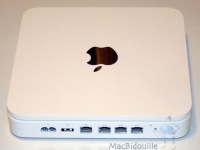
Changing a disk in the Time Capsule
Introduction
When we ordered a Time Capsule, we chose the 500 GB model, since this was sufficient and also less expensive than the 1 TB. However we had in mind that as the price of large disks came down, we would one day change the disk for a larger one.[From Hardmac.com : Le “Macbidouille” in English – Changing a disk in the Time Capsule]
MacDailyNews – Adobe Platform Evangelist: ‘Go screw yourself Apple’

Adobe Platform Evangelist: ‘Go screw yourself Apple’
Friday, April 09, 2010 – 05:27 PM EDT
“By now you have surely heard about the new iPhone 4.0 SDK language that appears to make creating applications in any non-Apple-approved languages a violation of terms,” Lee Brimelow, Adobe Platform Evangelist, blogs for The Flash Blog. “Obviously Adobe is looking into this wording carefully so I will not comment any further until there is an official conclusion.”MacDailyNews Take: Brimelow then inexplicably proceeds to comment further. This marks just the first of his many lies.
Brimelow continues, “What they are saying is that they won’t allow applications onto their marketplace solely because of what language was originally used to create them. This is a frightening move that has no rational defense other than wanting tyrannical control over developers and more importantly, wanting to use developers as pawns in their crusade against Adobe.”
MacDailyNews Take: Whiners whine and liars lie and sometimes they’re one and same. We already explained this quite clearly earlier today: “Flash is a proprietary, resource-hogging, browser-crashing abomination and we don’t want ported software; software designed for the lowest common denominator is inferior to software designed to take advantage of individual platforms’ strengths.” Adobe should understand this implicitly because they long ago turned their backs on the very platform that made their company in order to design their apps for Windows, the lowest common denominator. That is why Mac users suffer with inferior Adobe software today.
Brimelow continues, “The fact that Apple would make such a hostile and despicable move like this clearly shows the difference between our two companies. All we want is to provide creative professionals an avenue to deploy their work to as many devices as possible.”
MacDailyNews Take: So, Adobe doesn’t want to own the proprietary toolset to generate profits by controlling the Web’s multimedia platform. The angels just want to provide creative professionals with blah, blah, blah. Well then, Adobe should drop Flash into the dumpster where it belongs, and embrace the creation of cross-platform tools that enable people to deploy open standards, such as HTML5, that will work on as many devices as possible, including 85+ million iPhones, iPod touches, and iPads.
Brimelow continues, “Many of Adobe’s supporters have mentioned that we should discontinue the Creative Suite products on OS X as a form of retaliation. Again, this is something that Adobe would never consider in a million years. We are not looking to abuse our loyal users and make them pawns for the sake of trying to hurt another company. What is clear is that Apple most definitely would do that sort of thing as is evidenced by their recent behavior.”
MacDailyNews Take: Adobe won’t do that because they’d go under. Real creative professionals use Macs. Adobe can’t live off Window sufferers trying to use pirated Photoshop or Adobe’s craptastic Premiere.
Brimelow continues, “Personally I will not be giving Apple another cent of my money until there is a leadership change over there. I’ve already moved most of my book, music, and video purchases to Amazon and I will continue to look elsewhere. Now, I want to be clear that I am not suggesting you do the same and I’m also not trying to organize some kind of boycott. Me deciding not to give money to Apple is not going to do anything to their bottom line. But this is equivalent to me walking into Macy’s to buy a new wallet and the salesperson spits in my face. Chances are I won’t be buying my wallets at Macy’s anymore, no matter how much I like them.”
MacDailyNews Take: Adobe’s Platform Evangelist relegates himself to second-rate media services and that’s supposed to be some big statement?
Brimelow continues, “Now let me put aside my role as an official representative of Adobe for a moment as I would look to make it clear what is going through my mind at the moment. Go screw yourself Apple.”
MacDailyNews Take: Pure class and absolutely nothing new; it’s exactly what Adobe’s been saying to Apple Mac users for the last 15 years.
In the end, only one of these two companies will be screwed. It isn’t Apple.
[From MacDailyNews – Adobe Platform Evangelist: ‘Go screw yourself Apple’]